Internet Product Activation
The activation process of your Product for a computer with a valid Internet connection is fairly easy. In order to activate Spectralys with the described work flow you need:
Activation Prerequisites
In order to activate your Product the following information is required:
-
A valid serial number, which comes with the installation media of your Product or if you purchased it online, please contact your vendor for a valid serial number.
-
A computer with Internet access on which the Product is installed.
During registration via internet, your computer must contact the licensing server at labCognition. If any firewall of anti-virus program is running on your computer, please deactivate it for registration. Such programs might interfere and interrupt connection to the licensing server. In this case only manual registration is possible although the computer is properly connected to Internet.
Activation Steps
To activate your Product please execute the following steps:
-
Start the Software. On Windows 10 and Windows 11
machines the software needs to be started with Administrator Privileges! -
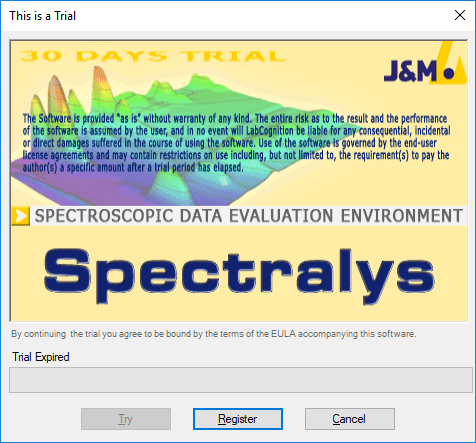
Click the Register Button in the Trial Dialog
-
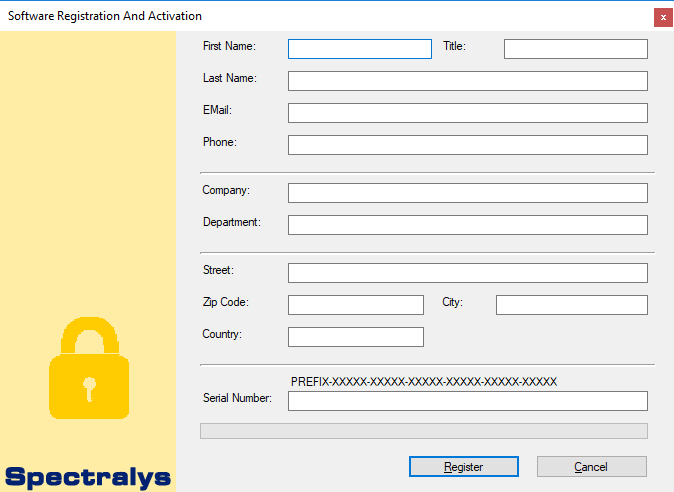
Enter your personal Registration Information into the form fields.
- Restart the Software to complete Activation.