Spectrum Measurement
All kinds of measurements can be acquired by either selecting the Measure Spectrum command in the Instrument menu, or by clicking the **Measure-**button in the Instrument Tab. The measurement type and additional settings can be selected by adjusting the acquisition parameters in the instrument tab. The available measurement parameters differ slightly between the MB and FTLA/FTPA instrument series:
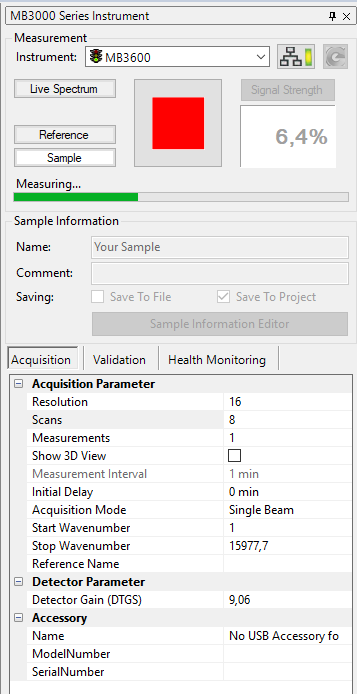
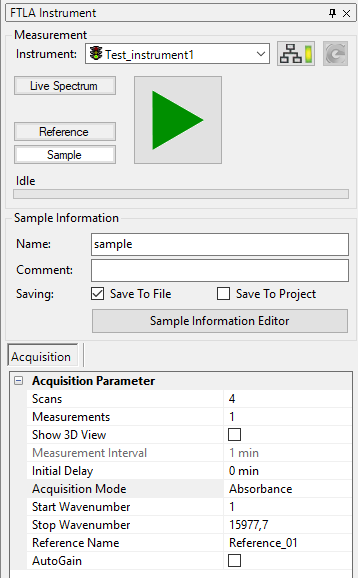
Regular Measurement
Performing regular measurements with the FTLA/FTPA and MB3000/3600 instrument is described in the following steps:
-
Open the lid of the sample compartment (if any is attached).
-
Insert a sample.
-
Close the lid of the sample compartment (if any is attached).
-
Setup the measurement parameters (see below).
-
Click the **Measure-**button in the Instrument Tab or select the command Measure Spectrum in the Instrument Menu.
After completion of the measurement, the spectrum will be displayed in the 2D-View area. Depending on the measurement parameter setup the spectrum may also be automatically saved to a designated project.
Kinetic Measurement
Performing kinetic measurements is very similar to the regular procedure. A kinetic measurement consists of a sequence of 2D measurements acquired with a particular delay time between the measurements. Collected data is saved in a 3D spectrum. The operator simply has to adjust the additional acquisition parameters Measurements and Interval:
Because of performance and memory considerations, the maximum number of measurements during a kinetic scan is limited to 1000 measurements!
-
Open the lid of the sample compartment (if any is attached).
-
Insert a sample.
-
Close the lid of the sample compartment (if any is attached).
-
Setup the basic measurement parameters (see below).
-
Enter a number > 1 and < 1000 into the Measurements parameter. The number of measurements can not exceed 1000!
-
Enter an Interval time which is considered as pause between two measurements (see below).
-
Click the **Measure-**button in the Instrument Tab or select the command Measure Spectrum in the Instrument Menu.
The measured spectra will be displayed as 3D-spectrum in the 3D-view area (display might be delayed, because at least two spectra need to be acquired before the 3D data can be displayed). As the kinetic measurement commences the 3D-spectrum will automatically be updated with the newest spectra. Depending on the measurement parameter setup the spectrum may also be automatically saved to a designated project.
Use the functions Show 2D Cuts or 2D-Extraction from the 3D View menu to easily navigate through the 3D spectrum and to extract 2D data objects from the 3D-spectrum.
Acquisition Parameters
Specifies parameters that directly affect data acquisition:
-
ResolutionSpecifies the scanning resolution of the instrument (Default = 1)
-
1, 2, 4, 8, 16, 32, 64 (all instruments)
-
128 (For FTLA/FTPA instruments only!)
The instrument provides several spectral resolutions. For each available resolution a separate reference measurement is required. In case of changing the resolution you may need to measure a fresh reference or choose one from disc. However, the last used reference for the active resolution is selected automatically if available.
-
Scans
Selects the number of scans per measurement. The number of scans defines how many scans are acquired to get a proper spectrum. The signal to noise ratio is getting better, if a higher number of scans is chosen. The default number of scans is 1 which gives you a good impression of the analyzed component. -
Measurements
Specifies the number of measurements to be acquired. When starting the measurement, the software will automatically acquire the number of measurements specified here. The first measurement will be delayed by the time specified in "Initial Delay" and the measurements will be separated by the time interval specified in "Interval". Using these parameters kinetic measurements can be set up easily. -
Show3D View
Controls the display of kinetic measurements. If this option is checked, multiple measurements will be displayed as 3D-object. If this is unchecked, mulitple measurements will be displayed as merged 2D-objects. -
IntervalSelects the time interval between two adjacent measurements. The time unit can be changed behind the value. The drop down box shoes all available units: seconds, minutes and hours. The interval parameter will only be editable if the number of measurements is > 1.
-
Initial Delay
Specifies the interval which is used prior to a measurement. Enter a value greater than 0 to use a pausing time before the very first measurement. Enter 0 if none is required. The time unit for the initial delay can be selected from a drop-down box behind the value. The drop down box shows all available units: seconds, minutes and hours. -
Acquisition Mode
Four different acquisition modes are available.
-
Single Beam
Produces a single beam spectrum. -
Absorbance
Produces a background corrected Absorbance spectrum. -
Transmittance
Produces a background corrected Transmittance spectrum.
When measuring an absorbance or transmittance spectrum a valid reference needs to be measured in advance. Alternatively, you may choose an existing reference by changing the Reference File parameter.
Reference is bound to the instrument resolution!
The instrument provides several spectral resolutions. For each available resolution a separate reference measurement is required. In case of changing the resolution you may need to measure a fresh reference or choose one from disc. However, the last used reference for the active resolution is selected automatically if available.
Irrespective of the measurement mode used, it will be possible to convert the intensity unit of your spectrum later on in the software using the Convert Y-Axis Unit function.
-
Start Wavenumber
Specifies the starting wavenumber of the scan range. This parameter defines the lower boundary wavenumber of the spectrum to be measured. The value must be given in wavenumber units. The Start Wavenumber is allowed to be in the interval [0 - 15799.7 cm-1]. The Start Wavenumber is required to be smaller than the Stop Wavenumber. -
Stop Wavenumber
Specifies the ending wavenumber of the scan range. This parameter defines the upper boundary wavenumber of the spectrum to be measured. The value must be given in wavenumber units. The Stop Wavenumber is allowed to be in the interval [0 - 15799.7 cm-1]. The Stop Wavenumber is required to be bigger than the Start Wavenumber. -
Reference Name
Specifies the reference spectrum to be used for the measurement. If a reference spectrum has been acquired it will automatically be entered here.
Detector Parameter
Specifies parameters that affect instrument operation. The following parameters are available:
-
Detector Gain
Detector gain of the instrument. -
First Gain
First gain stage of the instrument. (For FTLA/FTPA instruments only!) -
Second Gain
Second gain stage of the instrument. (For FTLA/FTPA instruments only!)
Accessory
Additional information and options of accessories connected to the instrument are display in this section.
Sample Information
Parameters concerning the data naming and saving can be specified here:
-
Name
Name of the current acquired sample. Please refer to the section Sample Information Editor for further details about automatic naming and saving. -
Comment
Additonal comment to save with the acquired sample.